See where your restaurant loses margin, and what to do about it today

Margin Flow works on top of your POS and stock accounting. It turns invoices, recipes, write-offs and stocktakes into a short list of actions, each with an amount in euros a month.

The demo is a fictional café with invented data. No sign-up needed.

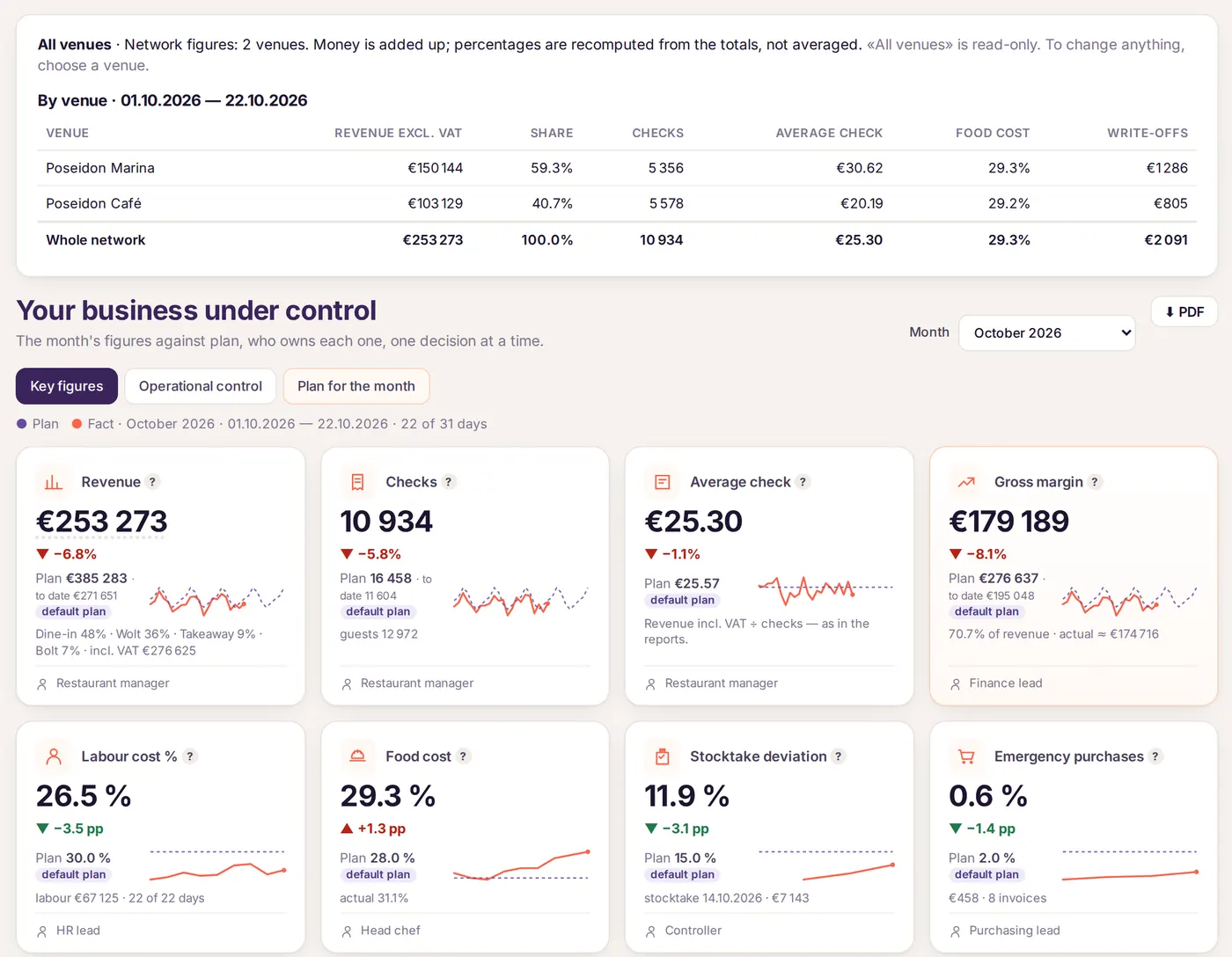
Margin Flow dashboard: revenue, checks, average check and margin against the month's plan, demo café
  • Works with Syrve
  • Tillo connector coming soon
  • No POS? Keep the books in Margin Flow

The books are kept. The money still leaks.

Most restaurants already enter invoices and count stock. The problem is that nobody turns those numbers into decisions.

Invoices are entered, recipes are set up

A stocktake once a month. The work is done and the numbers exist.

The stocktake ends in a minus

Shortages and surpluses are large, and finding the cause is manual work.

Food cost creeps up

Reports show the percentage, not the reason: prices, portions, storage or paperwork.

No list of things to do

Which numbers cost money, and what brings it back, is written nowhere.

Margin Flow writes that list, with an amount next to every line.

What's inside

One set of numbers from your POS and stock data. Each screen answers one question an owner actually asks.

Dashboard

Plan against fact, every morning

Revenue, food cost, labour cost, write-offs and stocktake deviation against your plan for the month, each with the person responsible. The owner lands here after signing in.

  • Forecast to the end of the month at the current pace
  • Plan set by you, or a sensible default from last year
  • Download as PDF for the weekly meeting
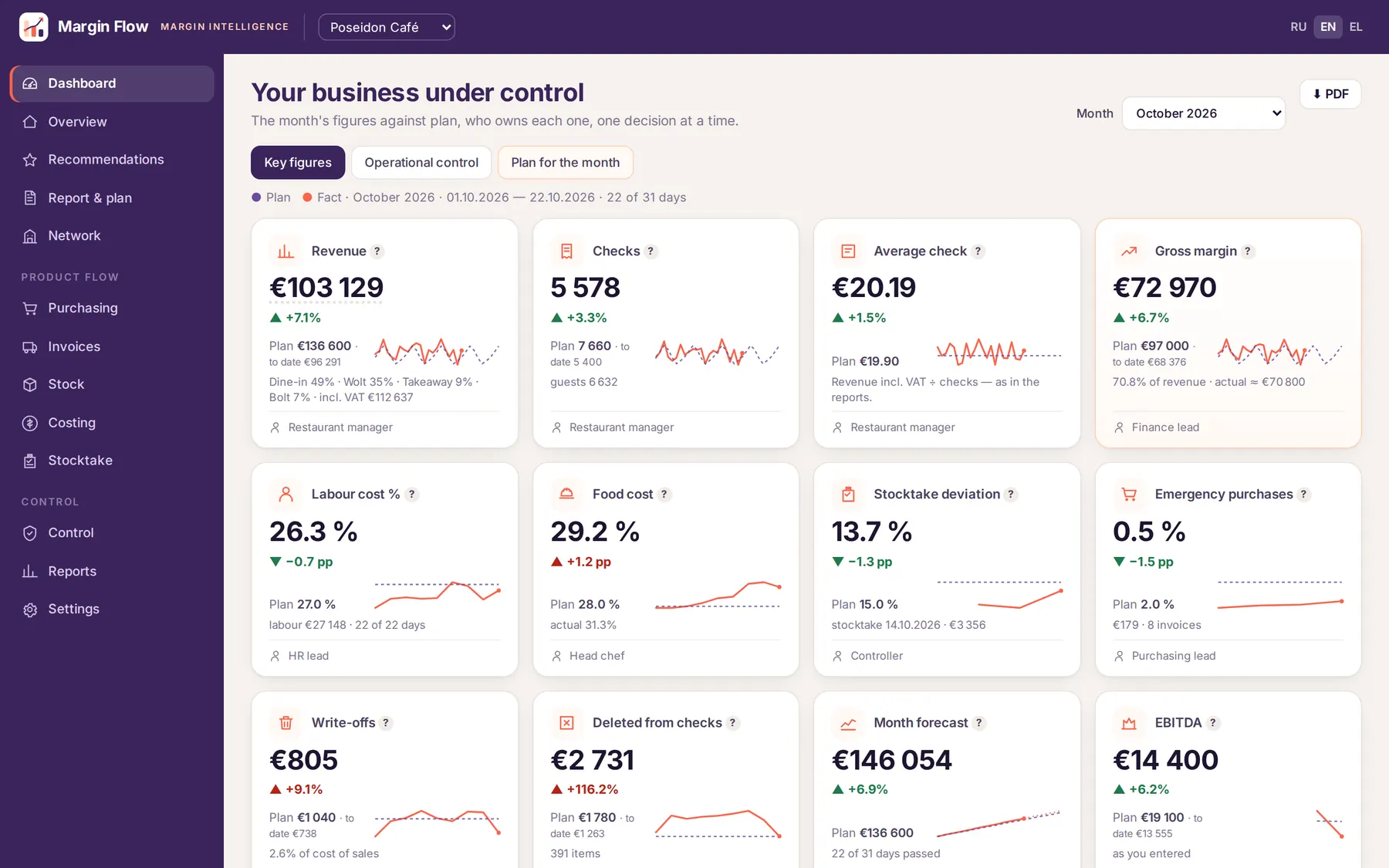
Dashboard screen: key figures against the month's plan with trend lines
Recommendations

Where the money leaks, in euros a month

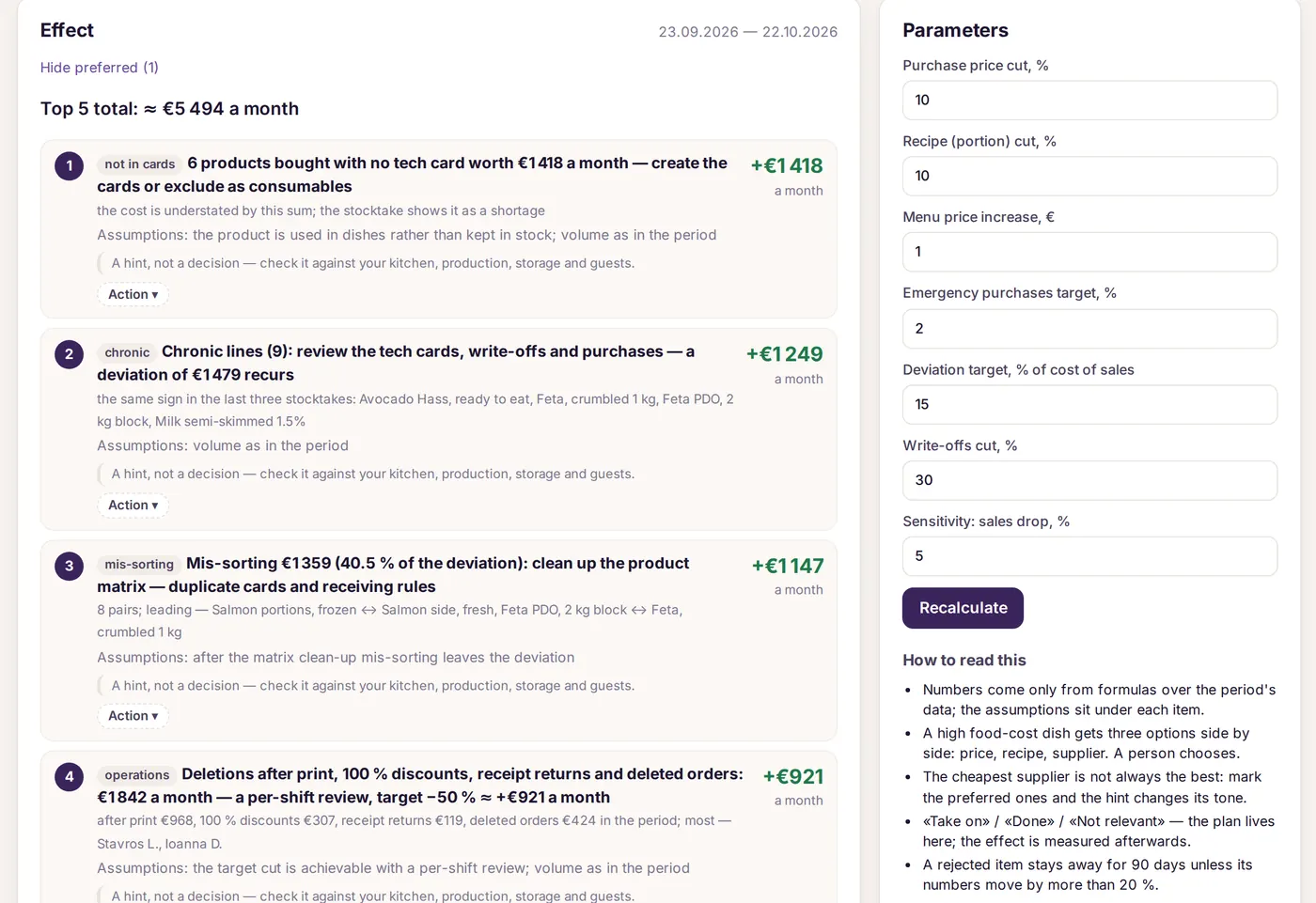
A ranked list of actions: create the missing recipe cards, renegotiate a price, trim a portion, review deletions by shift. Numbers come only from formulas, and the assumptions are written under each item.

  • Effect per month and per year for each action
  • Editable parameters: price cut, portion, target
  • A hint, not a decision: you choose what to do
Recommendations screen: ranked actions with an effect in euros a month
Invoice recognition

Photo of an invoice, lines in stock

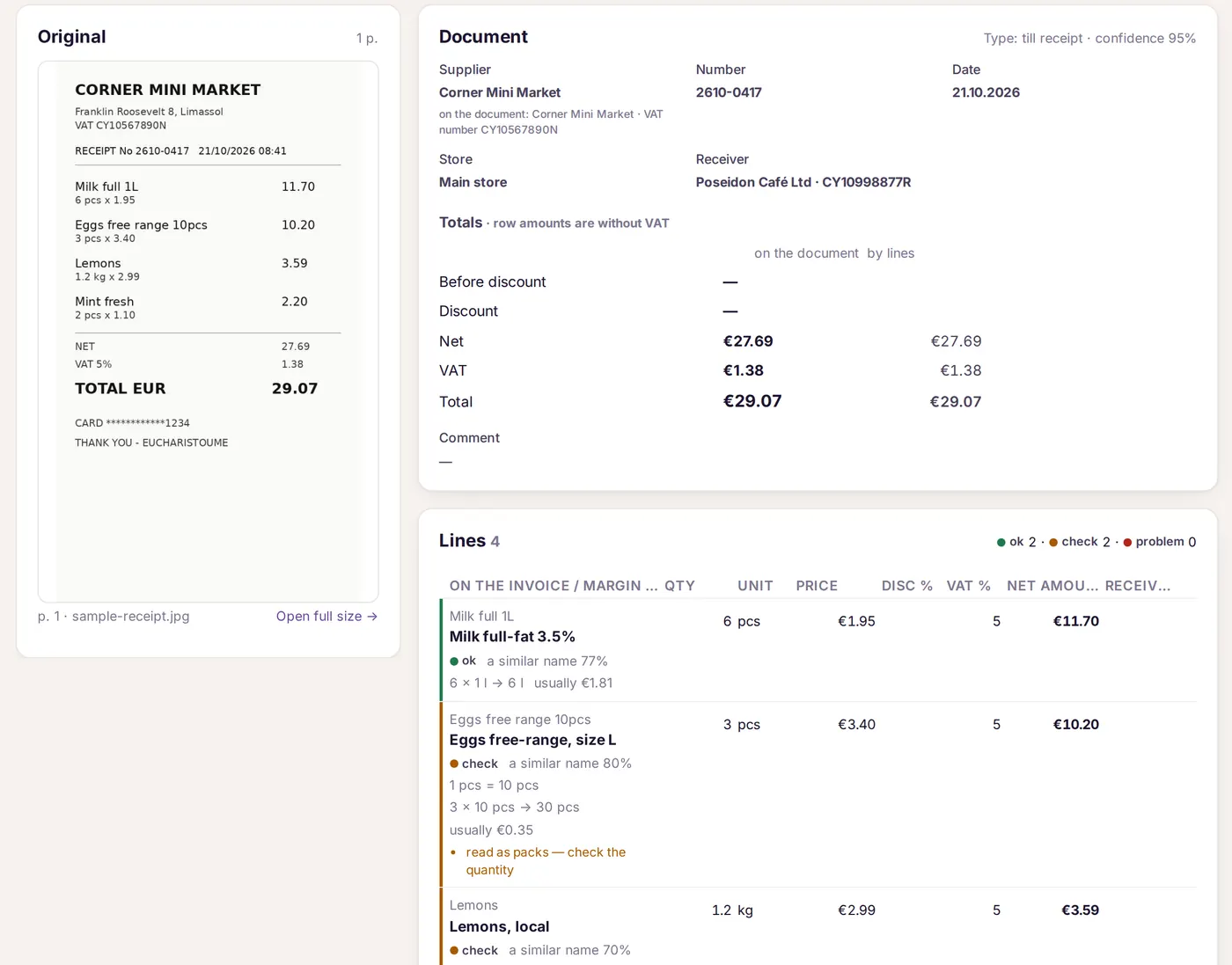
Send a photo or PDF to the Telegram bot @Invoiceinput_bot or upload it in the cabinet. Lines are read and matched to your items, doubtful ones are flagged. You review, approve and send to Syrve.

  • Checks quantity × price, VAT and totals
  • Flags prices that differ from your usual one
  • Remembers how each supplier names your products
Invoice review screen: original receipt next to recognised lines with ok and check statuses
Stocktake

A stocktake you can explain

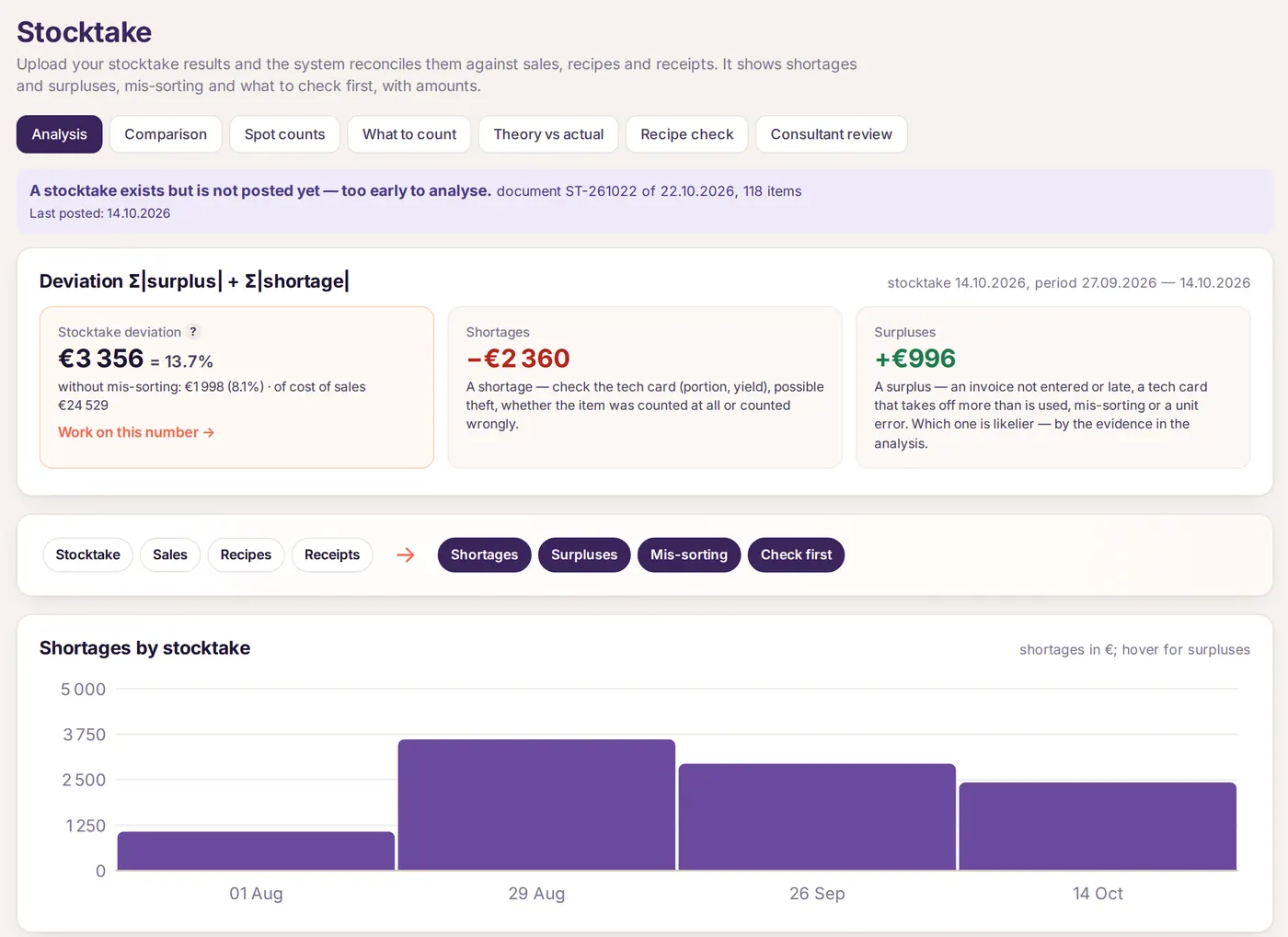
Shortages and surpluses are checked against sales, recipes and receipts. Mis-sorts are paired up, and a short list tells you what to recount first and who to ask.

  • A surplus usually means an invoice was not entered
  • Repeating shortages point to the recipe or the portion
  • Upload from Syrve or from an Excel template
Stocktake screen: deviation, shortages and surpluses with hints
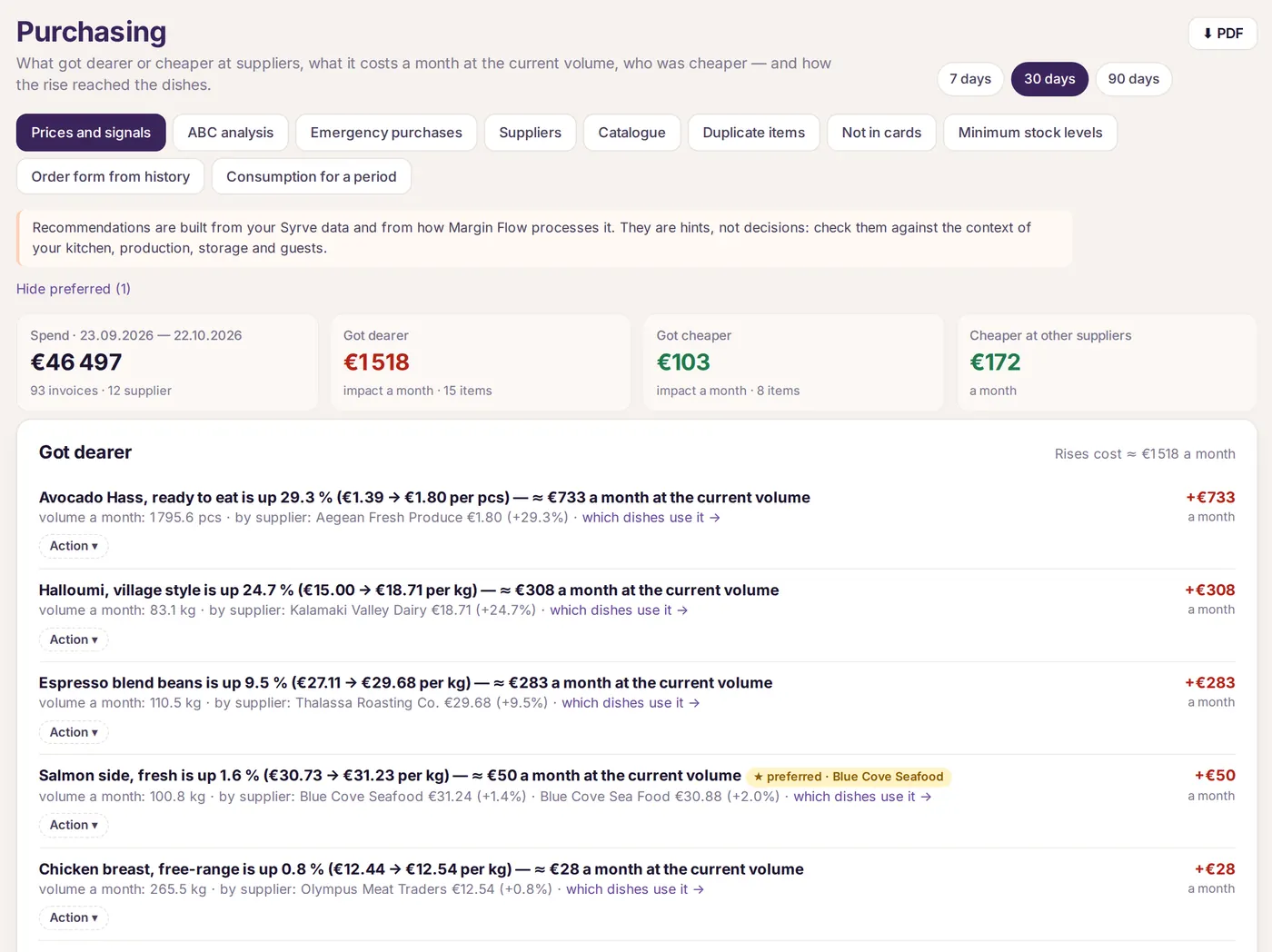
Purchasing screen: price rises by product with the effect a month

Purchasing and prices

What got dearer, what it costs a month at your volume, and where the same product was cheaper. Emergency purchases are compared with your usual price.

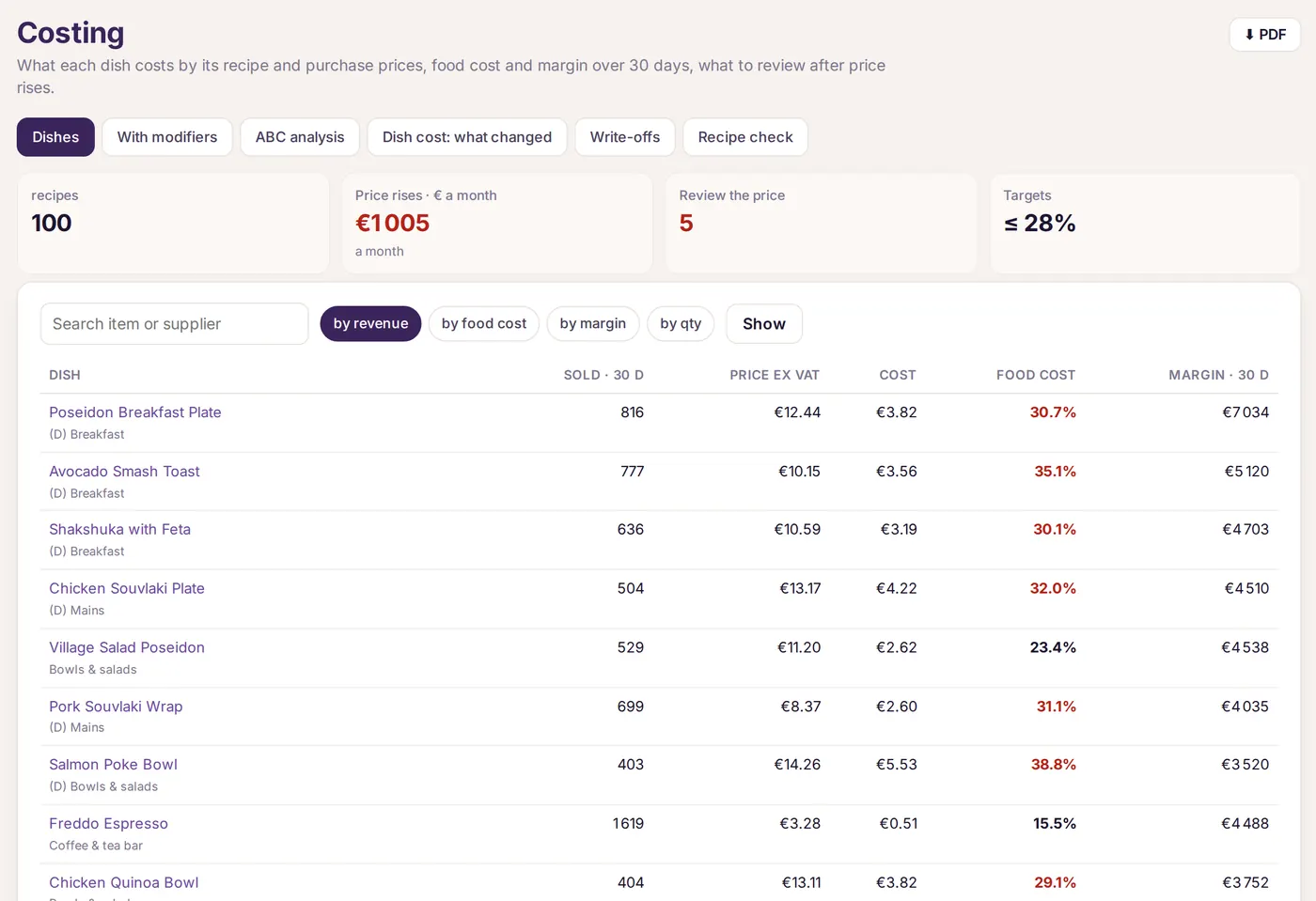
Costing screen: dishes with cost, food cost and margin

Food cost and recipes

Dish cost by recipe card, food cost and margin per dish, what changed after a price rise. Menu engineering shows what sells a lot at a low margin.

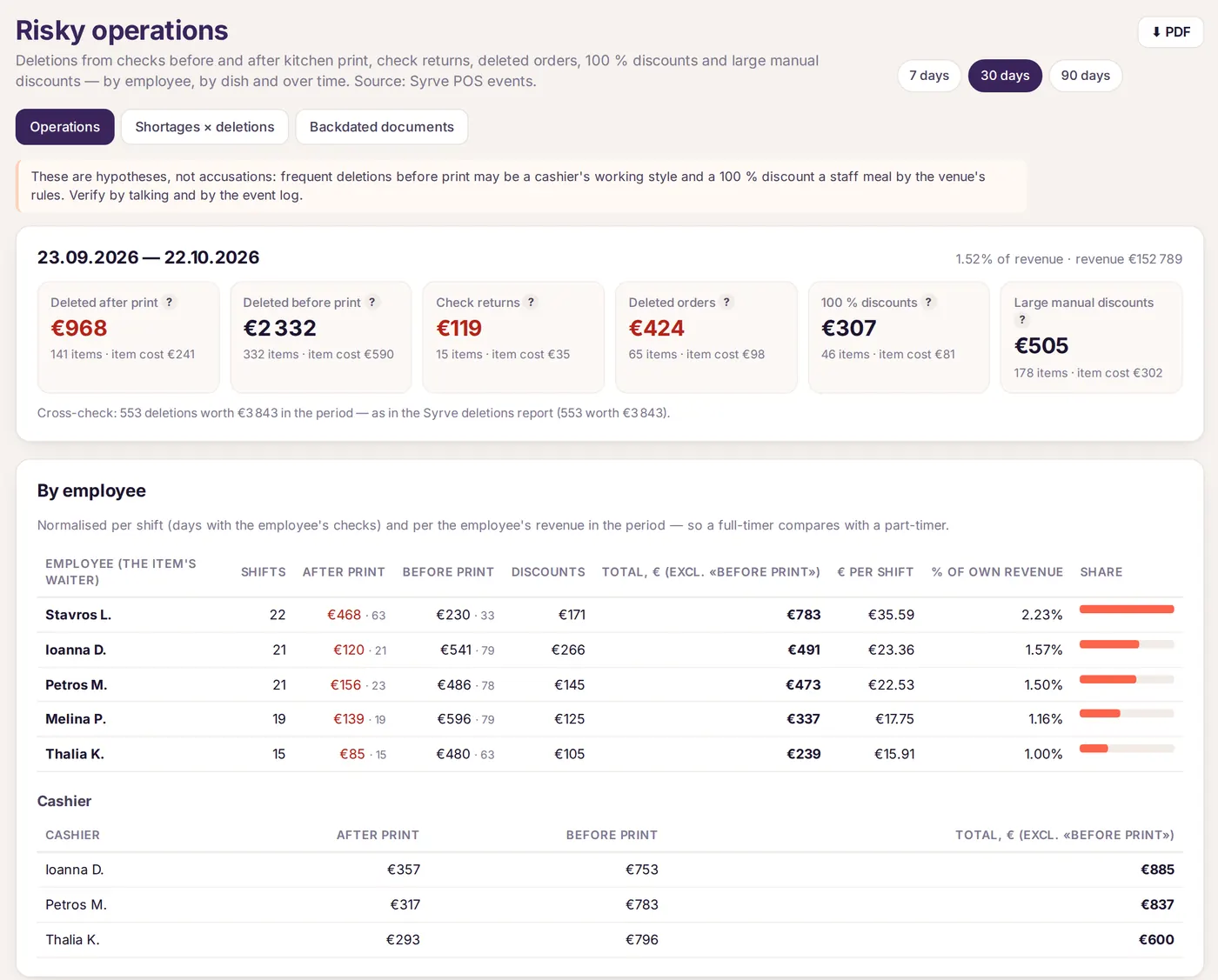
Risky operations screen: deletions and discounts by employee

Operations control

Deletions after the kitchen print, 100 % discounts, returns and back-dated documents, by employee and by shift. Hints to check, not accusations.

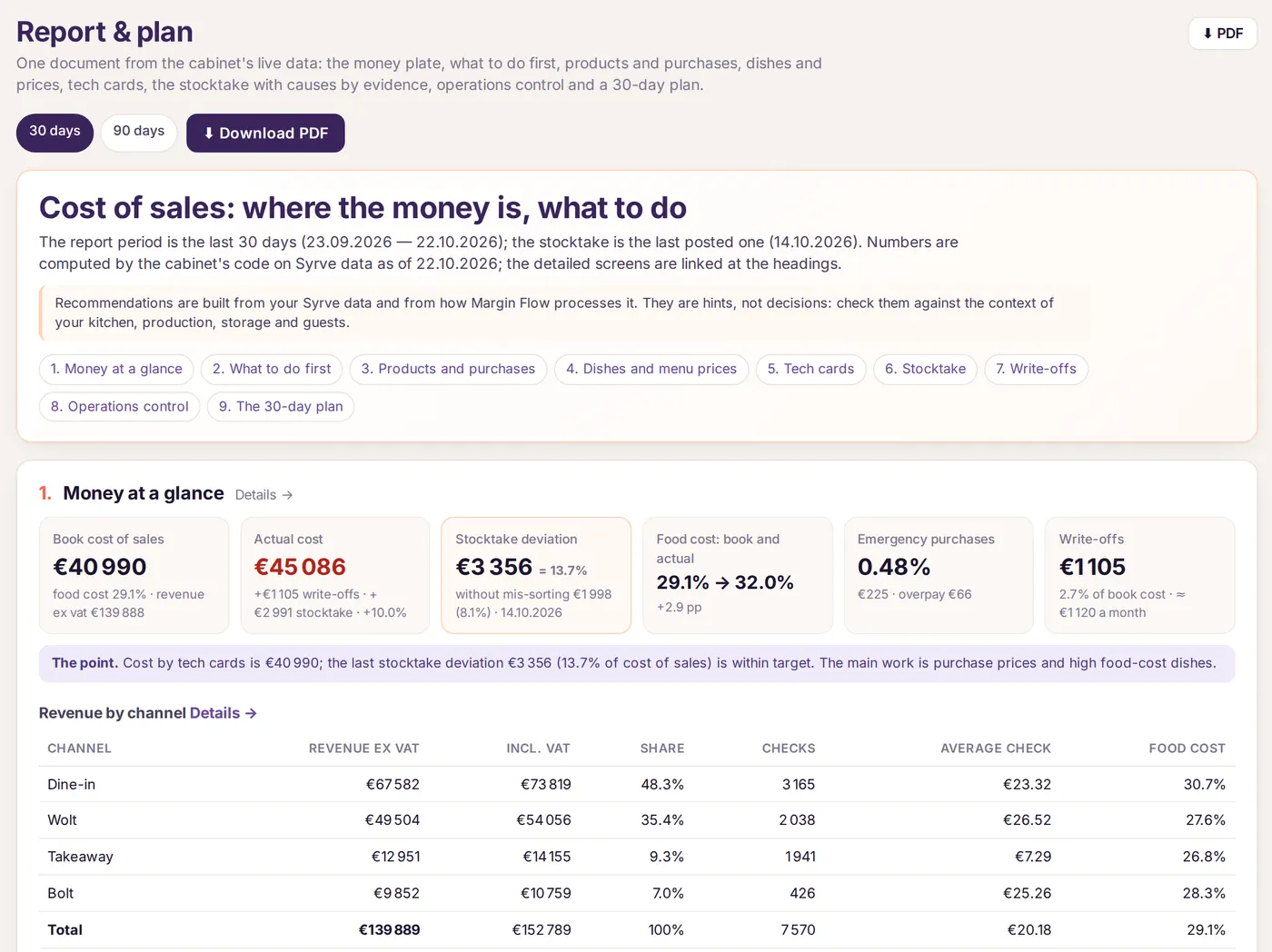
Report and plan screen: money at a glance and revenue by channel

Report and plan

One monthly document: money at a glance, what to do first, a 30-day plan with owners. Download as PDF or Excel.

All venues view: revenue, checks and food cost by venue

Chains and All venues

Look at one venue or all of them at once. Money is summed, percentages are recomputed from totals, every venue is broken out.

Rights by section (example)
Rights by section (example)InvoicesRecipesControl
Owneryesyesyes
Chefnoyesno
Accountantyesnono
Manageryesnoyes

Users and rights

The master account creates users and gives rights by section. Each company sees only its own data.

Who opens it, and what for

For owners of restaurants, cafés and small chains, and the people who run them day to day.

Owner

Is the month on plan, where the margin goes, what the team should do first.

Opens: Dashboard, Report

Manager

Emergency purchases, write-offs, deletions and discounts by shift.

Opens: Control, Purchasing

Chef and costing

Recipe cards, dish cost, portions, what to do when a product gets dearer.

Opens: Costing, Stocktake

Accountant

Invoices recognised, checked, matched to items and in the system on time.

Opens: Invoices

Connect the way you already work

Read-only access to your POS. Nothing to install in the restaurant.

Syrve

We create a read-only API user. A year of sales, invoices, write-offs, stocktakes and recipes loads in minutes. Margin Flow changes nothing in Syrve by itself.

Tillo Coming soon

Our own POS. The connector is being prepared; tell us in the request if you would like to be among the first.

Without a POS

Margin Flow keeps the books: invoices by hand or by photo, stocktakes from an Excel template. A POS can be connected later.

  1. Request

    Tell us about your venues in the form below.

  2. Read-only connection

    We connect your POS with a read-only key, or open a cabinet without a POS.

  3. First data in a day

    History loads, the first numbers on purchasing, dishes and stocktake appear.

  4. Onboarding

    We go through the first report together and set your plan and targets.

Questions owners ask

Is my data safe? Can Margin Flow change anything in my POS?

Access to the POS is read-only, and Margin Flow changes nothing in Syrve by itself. Data is stored on servers in the EU, each company is isolated from the others, and we do not sell data or use advertising trackers.

Which POS do you work with?

Syrve today. A connector for Tillo, our own POS, is on the way. Without a POS you can keep invoices and stocktakes in Margin Flow itself.

How fast will I see numbers?

Usually the day after connection: history loads in minutes, then the first numbers on purchasing, dishes and stocktake appear. The first full report is ready within the first week.

Which languages does it speak?

Russian, English and Greek. Each user switches the language in one click, and PDF reports come in the same language.

Can staff get limited access?

Yes. The master account creates users and gives rights by section, for example invoices only for the accountant or recipes only for the chef. Templates for typical roles are built in.

We have several venues. Does it work for a chain?

Yes. Each venue has its own view, and All venues shows the chain together: money summed, percentages recomputed from totals, each venue broken out.

How much does it cost?

Pricing is on request: it depends on the number of venues and what you connect. Leave a request and we will send an offer.

Request a demo

We will show Margin Flow on the demo café and, if you like, on your own data.

Want to look around first? Open the demo, no sign-up needed.

We use these details only to answer your request. See the privacy policy.